Lazy Metrics
spark-bestfit supports lazy metric evaluation with true on-demand computation. KS/AD metrics are computed only when you actually need them, providing significant performance improvements for model selection workflows.
Metric Computation Cost
Not all goodness-of-fit metrics have the same computational cost:
Metric |
Cost |
Notes |
|---|---|---|
SSE |
Fast (~ms) |
PDF evaluation at histogram bins |
AIC / BIC |
Fast (~ms) |
Log-likelihood sum |
KS-statistic |
Moderate (~100ms) |
O(n log n) sort + CDF computation |
AD-statistic |
Slow (~200-500ms) |
O(n log n) sort + 2n log operations |
With ~90 distributions (default), computing KS/AD for all can add 20-50 seconds to the total fitting time. With lazy metrics, you only pay this cost for the distributions you actually access.
Using Lazy Metrics
Enable lazy metrics to skip initial KS/AD computation during fitting:
Using FitterConfig (v2.2+, recommended):
from spark_bestfit import DistributionFitter, FitterConfigBuilder

fitter = DistributionFitter(spark)

# Build config with lazy metrics
config = FitterConfigBuilder().with_lazy_metrics().build()

# Fast fitting: skip KS/AD computation initially
results = fitter.fit(df, "value", config=config)

# Check if results are lazy
print(results.is_lazy)  # True

# Get best by AIC - fast, no KS/AD needed
best_aic = results.best(n=1, metric="aic")[0]
print(best_aic.ks_statistic)  # None (not computed yet)

# Get best by KS - triggers ON-DEMAND computation!
best_ks = results.best(n=1, metric="ks_statistic")[0]
print(best_ks.ks_statistic)  # 0.0234 (computed value!)
Using parameter directly:
# Alternatively, pass lazy_metrics parameter directly
results = fitter.fit(df, "value", lazy_metrics=True)
Key insight: When you call best(metric="ks_statistic") with lazy results,
spark-bestfit automatically:
Gets top N*3 candidates sorted by AIC (fast, already computed)
Computes KS/AD only for those candidates (not all ~90 distributions)
Re-sorts by actual KS and returns top N
This means you get correct results while computing metrics for only ~5% of distributions.
Materializing All Metrics
If you need all metrics computed (e.g., before unpersisting the source DataFrame),
use the materialize() method:
# Fit with lazy metrics
results = fitter.fit(df, "value", lazy_metrics=True)

# Fast model selection
best_aic = results.best(n=1, metric="aic")[0]

# Before unpersisting, materialize all metrics
materialized = results.materialize()
print(materialized.is_lazy)  # False

# Now safe to unpersist source data
df.unpersist()

# Access any metric on materialized results
best_ks = materialized.best(n=1, metric="ks_statistic")[0]
print(best_ks.ks_statistic)  # Computed value
Warning
If you try to compute lazy metrics after the source DataFrame has been
unpersisted, you’ll get a RuntimeError. Always call materialize()
before unpersisting if you need KS/AD metrics later.
When to Use Lazy Metrics
Use lazy_metrics=True when:
You’re doing model selection using AIC/BIC (recommended for most cases)
You’re iterating quickly and want faster feedback
You only need KS/AD for a few top candidates
You’re fitting many distributions and want faster iteration
Use lazy_metrics=False (default) when:
You need KS/AD statistics for all distributions upfront
You want to filter results by KS thresholds (
filter(ks_threshold=0.1))You need p-values for statistical significance testing on all fits
You plan to serialize results and need complete data
Filter Behavior
Note that filter(ks_threshold=...) cannot trigger lazy computation because
it needs to evaluate all rows. If you use filtering with lazy results, a warning
is emitted:
# This will warn - can't lazily compute for filter
filtered = results.filter(ks_threshold=0.1)

# Instead, materialize first, then filter
materialized = results.materialize()
filtered = materialized.filter(ks_threshold=0.1)
Why Lazy Metrics Matters
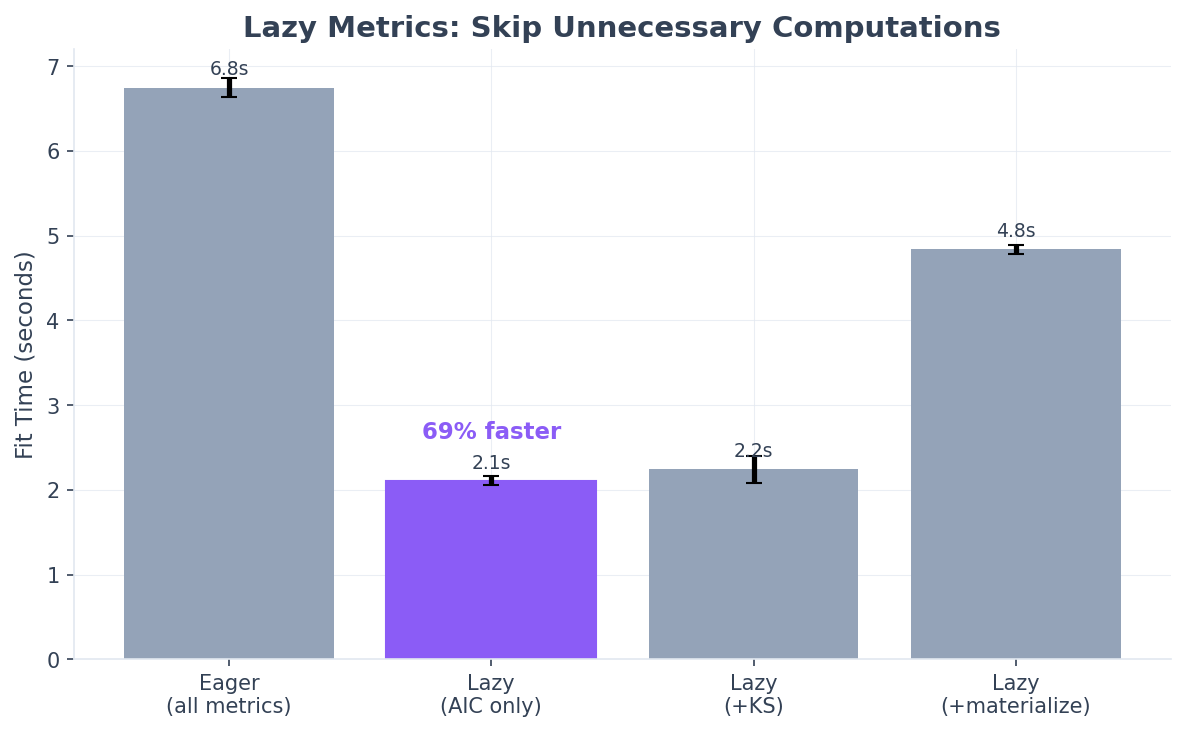
The value of lazy metrics isn’t measured in wall-clock speedup for a single fit - it’s about skipping work you don’t need across your entire workflow.
The core insight: When fitting ~90 distributions (default), you typically only examine the top 3-5 results. With eager evaluation, you compute KS/AD statistics for all 90 distributions. With lazy evaluation, you compute them for only the ones you actually access.
Workflow |
Eager Mode |
Lazy Mode |
|---|---|---|
|
90 KS/AD computations |
0 KS/AD computations |
|
90 KS/AD computations |
~5 KS/AD computations |
|
90 KS/AD computations |
90 KS/AD computations |
Scaling Characteristics
Why lazy metrics scales well for production workloads:
Fixed sample size: KS/AD computation uses a fixed 10K sample regardless of data size. The savings are constant whether you have 100K rows or 1 billion rows.
Multiplicative savings: When fitting multiple columns or running repeated experiments, the savings multiply:
10 columns x 5 iterations x 85 skipped distributions
= 4,250 KS/AD computations avoided
Interactive workflows: During exploratory analysis, you iterate quickly using AIC/BIC for model selection. Lazy metrics gives you instant feedback without waiting for KS/AD computation you won’t use until final validation.
Surgical on-demand computation: When you request
best(metric="ks_statistic"), we get top candidates by AIC first (already computed), then compute KS/AD for only those ~5 candidates - not all 90 distributions.
Production recommendation: Use lazy_metrics=True as the default for
exploratory analysis and model selection. Only use lazy_metrics=False when you
need KS/AD statistics for all distributions upfront (e.g., for comprehensive reports
or filtering by KS threshold).